Trafficlightdata Service -API
This service implements multiple HTTP REST -interfaces providing different information, which are derived and calculated from data gathered from trafficlight devices and detectors. In addition, metadata of available devices and detectors are provided.
Trafficlightdata Service is a HTTP REST -API, where user can query and receive data by providing path- and query-parameters to e.g. narrow the result dataset’s timeframe and/or filter the desired device(s)/detector(s) data to be returned in the response payload.
All query interfaces are requested using basic HTTP GET -method and responses are either in Datex2/XML, JSON or CSV formats.
Basics: Device and detector names
The device name consists of two parts. The first part is the city identifier and the second part is a unique number.
Example: "tre301": "tre" refers to the city of Tampere and "301" is a unique identifier. The full name is used in API requests, but only the unique identifier is used in intersection images, for example.
The detector name usually consists of three parts.
The first is the direction of arrival. The second is the distance in meters from the stop line. The third part is the lane identifier.
Example ”a35_1”: ”a” is the direction of arrival. ”35” is the distance in meters from the stop line. ”_” separates two values. ”1” is lane identifier.
Example "b100": "b" is the direction of arrival. "100" is the distance in meters from the stop line. The detector covers one lane, or the detectors are connected in parallel. The intersection image provides the answer.
Metadata supporting the use of interfaces
When using interfaces, it is advisable to utilize the following metadata sources. A list of trafficlight devices and detectors supported by the service, as well as information about their locations. This information can be found, for example, in intersection images and the City of Tampere information portals, as well as by performing data type-specific metadata queries via Swagger.
Trafficlightdata service coverage
Although there are several detectors at intersections, only some of them are suitable for traffic measurements. The supported intersections and their detectors can be retrieved using Swagger’s data type-specific metadata interfaces.
Intersection images
This folder includes almost all intersections from Tampere area. Data is not available from all intersections. Some intersection images contain more than one intersection.
Examples
- LV101_Gk24.pdf = tre101
- LV105_106_Gk24.pdf = tre105 and tre106
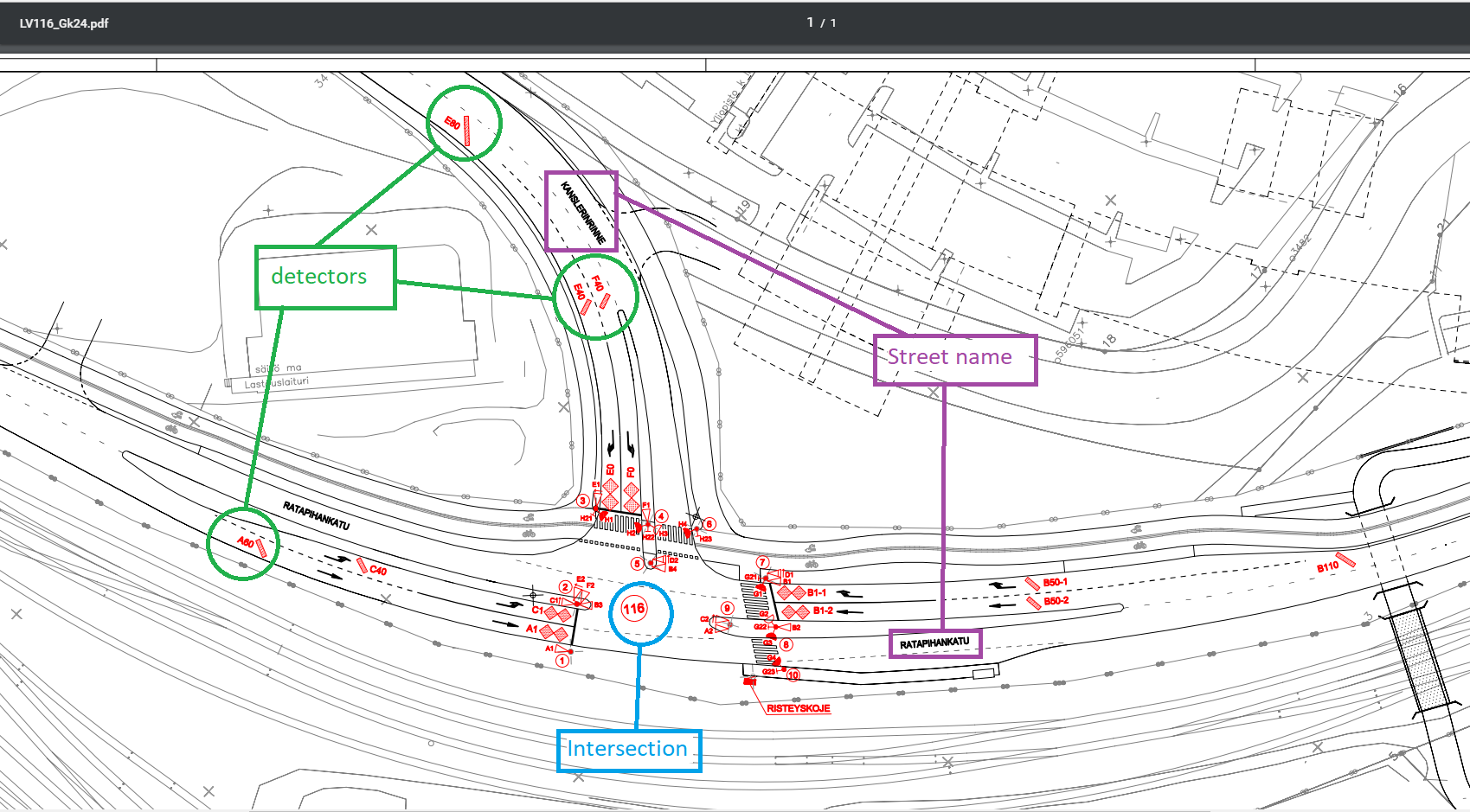
Useful trafficlight information provided by City of Tampere
City of Tampere maintains data of traffic light intersections, equipment and detectors. Locations of detectors and intersection are distributed from GeoServer and supported formats are WFS, WMS, Shape-zip, JSON and CSV. Trafficlightdata Service in NOT linked with City of Tampere's information portals, so 100 percent equality can not be guaranteed.
Help and Assistance
See ITS Factory Developer Wiki
Note that you need to have login permissions for service configuration tasks.
Existing configurations can be checked by retrieving the metadata for each data type. For example, traffic volume metadata can be retrieved using the "GET /v1/trafficAmount/metadata" API. Adding duplicates is not permitted.
When configuring intersection data for the service, it is recommended to follow this procedure when adding new intersections and detectors:
1. Get a list of new (i.e., not yet defined) devices using the ‘GET /api/v1/priv/all/new’ API.
2. Configuration is performed one intersection and data type at a time. Select the intersection to be processed and retrieve the detector data for it using the ‘GET /v1/priv/all/new/{deviceName}’ API’ or a data type specific API, e.g., ‘GET /v1/priv/trafficAmount/new/{deviceName}’. (Note: the API only lists detectors that have not yet been defined.)
3. Based on the intersection images and the names of the detectors you searched for, select the appropriate detectors you want to add to the data type. You cannot add the same detector multiple times. If you try to add existing detectors, they will be ignored, as will detectors with names that do not exist, for example, due to a spelling mistake. The update process will return the incorrect names in the response so that you can correct them. Valid detector names will be added.
When adding new detectors to an already existing intersection configuration, skip the first step above and continue.
You can retrieve a list of configured but no longer existing detectors using the ‘GET /v1/priv/all/lost’ interface. These or other unnecessary detectors can be removed using the data type specific DELETE-interface, e.g., for congestion the ‘DELETE /v1/priv/congestion/del/{deviceName}/{detectorName}’ API.
